Filing a tax return that claims real estate professional status without verifying every element of your qualification is like driving without checking your mirrors. You might be fine, or you might get blindsided in an audit. This 10-point checklist walks you through every verification step you should complete before your CPA files your return, from confirming hour totals to reviewing supporting documentation and preparing for the questions an IRS examiner would ask.
Why a Year-End Review Matters
REPS claims are among the most audited positions on individual tax returns, particularly for high-income taxpayers. The IRS knows that REPS unlocks substantial deductions, and it allocates examination resources accordingly. A year-end review catches errors, fills documentation gaps, and ensures that your qualification is airtight before it becomes part of your filed return.
Mistakes discovered after filing are far more expensive to fix than mistakes caught during preparation. An amended return triggers scrutiny. A failed audit triggers penalties and interest on top of the additional tax owed.
Take the time to complete this checklist before handing your records to your tax preparer.
Checklist Item 1: Total Your REPS Hours
Pull your hour log and calculate the total hours you spent on real property trades or businesses during the tax year.
The threshold: More than 750 hours. Not 750 exactly. More than 750.
What counts: Hours spent in real property trades or businesses in which you materially participated. This includes property management, maintenance coordination, acquisition research, financial management, property inspections, tenant relations, and related activities.
What to verify:
- Your total exceeds 750
- Every entry has a date, duration, description, and property
- You have no duplicate entries or obvious errors
- Hours are logged contemporaneously (not reconstructed from memory at year-end)
- The total is consistent with your lifestyle (a stay-at-home parent logging 2,000 hours is plausible; someone with a full-time job logging 2,000 hours in addition to their job hours requires explanation)
Checklist Item 2: Verify the More-Than-Half Test
The second prong of REPS qualification requires that more than half of all personal services you performed during the year were in real property trades or businesses.
How to test: List all personal service activities during the year and their approximate hours:
| Activity | Annual Hours |
|---|---|
| Real estate activities | [Your REPS hours] |
| Other employment (W-2, 1099, freelance) | [Hours] |
| Other business activities | [Hours] |
| Total personal services | [Sum] |
Real estate hours must be more than 50% of the total.
Common issues:
- If you took a part-time job, those hours count against you
- If you run a non-real-estate business, those hours count against you
- Volunteer work that constitutes personal services may count (but this is a gray area; consult your advisor)
- Household duties and childcare generally do not count as personal services
Checklist Item 3: Confirm Material Participation in Each Activity
REPS qualification alone is not sufficient. You must also materially participate in each rental activity (or in the grouped activity if you elected grouping under Treas. Reg. 1.469-9(g)).
If you elected grouping: Verify material participation for the single grouped activity. Your total hours across all properties should satisfy Test 1 (more than 500 hours) or another applicable test.
If you did NOT elect grouping: Verify material participation in each property individually. For each property, confirm which test you satisfy:
- Test 1: More than 500 hours on that property
- Test 3: More than 100 hours on that property AND more than any other individual
- Test 5: Material participation in any five of the prior ten years
- Another applicable test
Remember: Spousal hours combine for material participation under IRC Section 469(h)(5). Your spouse’s hours on a property count toward your material participation test for that property. But spousal hours do NOT count toward REPS qualification.
Checklist Item 4: Review the Grouping Election
If you have filed a grouping election under Treas. Reg. 1.469-9(g):
- Confirm it was properly filed with your original return for the election year. Find a copy of the election statement.
- Verify it covers all current properties. The election applies to all rental real estate interests, including properties acquired after the election was made.
- Consider whether grouping still serves you. If you plan to sell a property next year, review the implications of the grouped activity on loss release.
If you have NOT filed a grouping election but should have:
- Can you file it this year? The election must be made with the original return for the year. If you qualify as a REPS for the first time this year, you can make the election now.
- Is it the right move? Review the pros and cons before electing. The election is irrevocable.
Checklist Item 5: Audit Your Hour Log for Quality
Beyond the total, examine the quality of your entries. An IRS examiner looks for:
Specificity: “Property management – 2 hrs” is weak. “Called ABC Plumbing for bid on water heater replacement at 123 Maple St, reviewed three quotes, selected vendor, scheduled installation for next Tuesday – 1.5 hrs” is strong.
Variety: A log with the same entry repeated daily (“managed properties – 2 hrs”) lacks credibility. Real property management involves diverse tasks that should be reflected in your log.
Consistency with property type and scale: Three single-family rentals with stable tenants should not generate 2,500 hours of management activity. The hours should be proportional to the portfolio’s size and complexity.
Contemporaneous recording: Are your entries dated and logged in real time, or does the log look like it was created in one sitting? Entries logged throughout the year with varying descriptions and natural gaps (weekends, holidays) are more credible than a uniform block of entries.
Checklist Item 6: Gather Supporting Documentation
Your hour log is your primary evidence, but supporting documents corroborate it. Gather:
- Emails and text messages with tenants, contractors, and vendors (showing communication on the dates you logged hours)
- Contractor invoices and receipts (confirming work was performed on properties you manage)
- Bank and credit card statements (showing property-related purchases on relevant dates)
- Photos of maintenance work, property inspections, or improvement projects
- Mileage records or travel logs (supporting travel time to properties)
- Calendar entries (showing appointments, property visits, and meetings)
- Property management software records (if used)
- Lease agreements, tenant applications, and correspondence
You do not need to submit these with your return, but they should be organized and accessible in case of audit.
Checklist Item 7: Verify Property Classification
For each property, confirm the correct classification:
Long-term rentals (average stays over 30 days): These are rental activities under the standard rules. REPS qualification plus material participation is required for non-passive treatment.
Short-term rentals (average stays of seven days or less): These are not rental activities under Treas. Reg. 1.469-1T(e)(3)(ii)(A). Material participation alone makes them non-passive. Verify the average stay calculation is documented.
Properties with average stays between 7 and 30 days: These may qualify under the significant personal services exception (Treas. Reg. 1.469-1T(e)(3)(ii)(B)) or may default to rental activity treatment. Confirm the classification with your advisor.
Personal-use properties: If you used a property personally for more than the greater of 14 days or 10% of rental days, IRC Section 280A limitations may apply, reducing your deductible losses regardless of REPS status.
Checklist Item 8: Review Depreciation and Cost Segregation
REPS unlocks the ability to use rental losses, but depreciation generates the losses. Verify:
- Cost segregation studies are completed for eligible properties and the results are properly reflected in your depreciation schedules
- Bonus depreciation percentages are correctly applied for the current tax year (the percentage has been phasing down)
- New property acquisitions during the year have depreciation starting from the placed-in-service date
- Disposed properties have final depreciation calculated through the disposition date
- Land value is correctly excluded from depreciable basis
Checklist Item 9: Check State Tax Implications
REPS is a federal tax concept. State treatment varies:
- Does your state recognize REPS? Some states do not, meaning rental losses remain passive at the state level regardless of your federal qualification.
- Does your state follow the federal grouping election? Some states require separate activity treatment.
- Do you have properties in multiple states? Income and losses may need to be allocated to each state where properties are located.
- Are there state-specific hour requirements or documentation standards?
Confirm with your tax preparer that your state returns are consistent with your federal REPS position, or that any differences are intentionally and correctly handled.
Checklist Item 10: Prepare Your CPA Package
Deliver a complete, organized package to your tax preparer:
Document 1: Annual hour summary. A one-page summary showing:
- Total REPS hours for the year
- Hours broken down by property
- Hours broken down by category (management, maintenance, financial, etc.)
- Confirmation that the more-than-half test is satisfied (list of all personal service activities)
Document 2: Material participation confirmation. For each property (or the grouped activity):
- Total hours of your participation
- Which material participation test is satisfied
- If using Test 3, a comparison showing your hours vs. the highest individual contractor
Document 3: Grouping election. Copy of the election statement (if previously filed) or a draft statement for first-year election.
Document 4: Detailed hour log. The complete log for the year, available for review but not necessarily submitted with the return.
Document 5: Supporting documentation index. A summary of supporting documents available (invoices, emails, photos, etc.) and where they can be accessed if needed.
Bonus: Pre-Audit Preparation
Even if an audit never comes, preparing as though it will gives you confidence in your filing:
Practice explaining your REPS qualification in plain language. If an IRS examiner asked, “Tell me about your real estate activities this year,” could you provide a clear, consistent narrative that matches your log?
Identify the weakest point in your documentation. Every REPS claim has a vulnerability, whether it is a month with low activity, a task category with vague descriptions, or contractor hours that are close to your own. Know where your weak point is and have an explanation ready.
Keep your records for at least seven years. The standard audit period is three years, but the IRS can extend it to six years if there is a substantial understatement of income. Seven years provides a comfortable buffer.
Frequently Asked Questions
When should I complete this checklist?
Ideally, complete the review in late December or early January, before you hand your records to your tax preparer. This gives you time to address any gaps while the year’s activities are still fresh in your memory.
What if I discover I am short of 750 hours in December?
If you genuinely perform additional real estate activities in December, those hours count. But fabricating hours or logging non-real-estate activities as real estate work is fraud. If you are legitimately short, discuss the implications with your tax advisor before filing.
Do I need to submit my hour log with my tax return?
No. The hour log is not filed with your return. It is maintained as a supporting document in case of an audit. Your CPA uses it to verify qualification and prepare the return.
What if I changed my management approach mid-year?
Document the change. If you switched from self-management to a property manager in June, your hour log should reflect higher personal hours in the first half and a shift in activities in the second half. The change itself is not a problem, but it should be explained, not hidden.
Should I have my CPA review my hour log for reasonableness?
Yes, strongly recommended. A CPA experienced with REPS claims can identify entries that lack specificity, hours that seem disproportionate to the portfolio size, or documentation gaps that would be flagged in an audit.
What if I filed REPS in prior years but did not do this review?
Consider performing a retroactive review of prior years, especially if you are within the audit window (generally three years from filing). If you discover problems with prior filings, consult your tax advisor about the best course of action.
Can my CPA file the grouping election on my behalf?
Yes. Your CPA attaches the election statement to your return as part of the filing process. Provide the necessary information (list of properties, qualifying taxpayer, etc.) and confirm that they include the statement.

Key Takeaways
- Verify your total exceeds more than 750 hours with a margin of safety
- Confirm the more-than-half test by listing all personal service activities
- Demonstrate material participation in each property or the grouped activity
- Review your grouping election status and confirm it was properly filed
- Audit your hour log for specificity, variety, and contemporaneous recording
- Gather supporting documentation (emails, invoices, photos, mileage records) and organize it for potential audit use
- Verify property classifications, especially for STR properties near the seven-day threshold
- Confirm depreciation schedules and cost segregation studies are properly reflected
- Check state tax treatment of REPS in every state where you file
- Deliver a complete, organized package to your CPA that tells a clear story of your qualification
Build Your Audit-Ready REPS Log with REPSLog
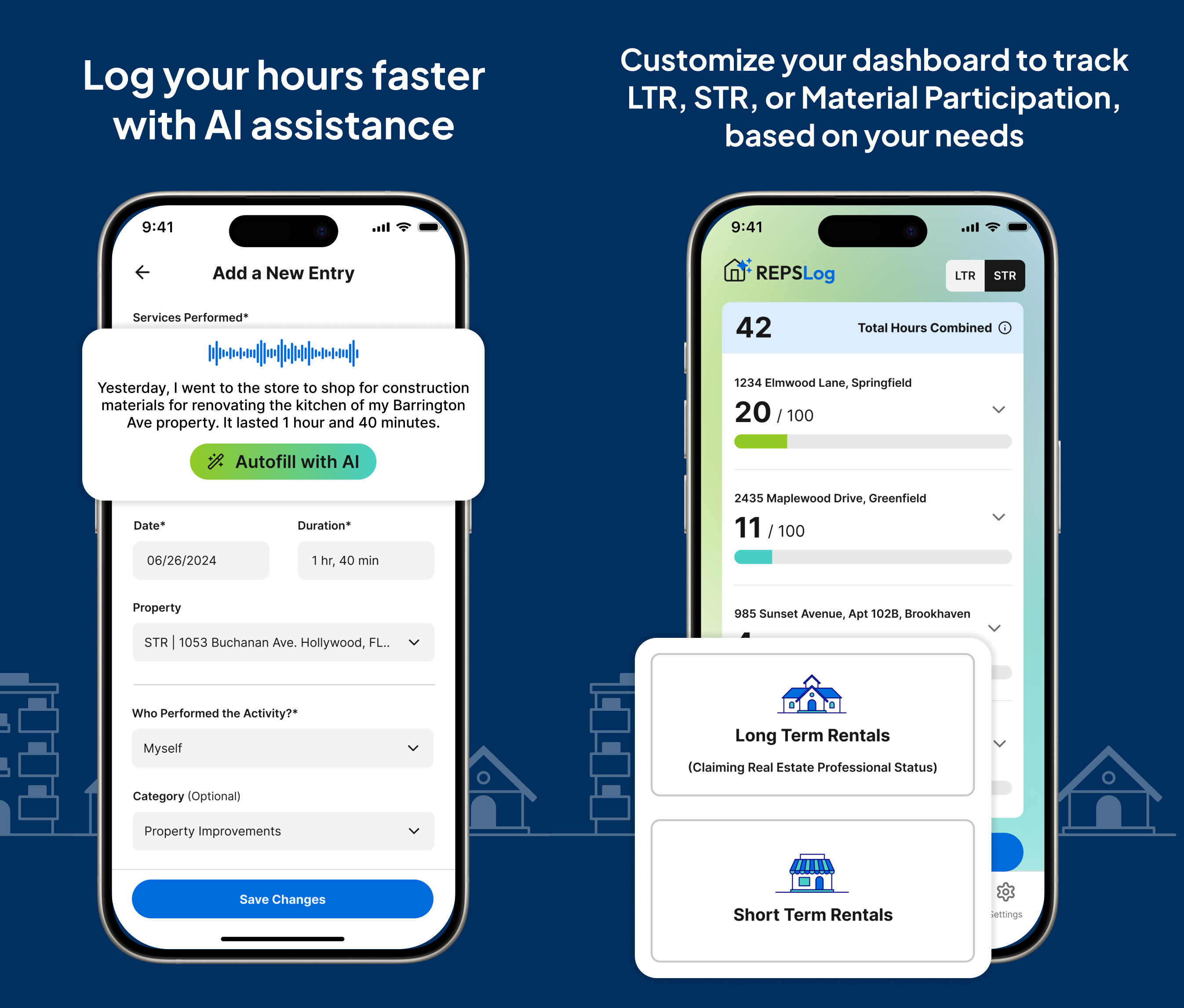
REPSLog is designed to make this year-end review straightforward. Track your activities throughout the year by property, category, and participant, and generate the summaries your CPA needs at tax time.
Available on iOS | Android | Web
This article is for educational purposes only and does not constitute tax or legal advice. Consult a qualified tax professional for guidance tailored to your situation.
Do this in REPSLog
- Hours Dashboard and Stats: hours by property, category and year against your goal.
- CPA-ready Export (PDF and CSV): a tax year as PDF and CSV, split by LTR and STR, with receipts.
- REPS Hour Tracking Goals (750 / 500 / 100): pick the 750, 500 or 100-hour test and watch progress per year and per property.
Step by step in the Help Center: how to use it. Try REPSLog free for 14 days on iPhone, Android or the web app.