Look at any honest REPS log and the same descriptions come back week after week: collected rent, coordinated the plumber, answered guest messages, restocked the cabin. The tax value of those entries is in their consistency and their dates, not in the prose. The cost is the typing, and typing is what people stop doing in March. This post covers the two features in REPSLog that take the retyping out: a curated list of common and recurring activities, and, on Premium, suggestions learned from your own log.
Repetition is normal, and the IRS knows it
Examiners are suspicious of logs that look fabricated, and one of the tells they cite is duplicate, templated entries with identical durations. That is not a reason to avoid repeated tasks, which are the reality of managing rentals; it is a reason for each repeated entry to carry its own date, its own duration and its own property. The contemporaneous log post covers what a defensible entry looks like. Both features below prefill the words and leave the date, property and real duration to you.
Common and Recurring Activities
Below your hour counters on the Overview, REPSLog shows rows of tiles under Common Activities and Recurring Activities. The list is curated by REPSLog and follows your view. In the long-term rental view the tiles are landlord tasks such as Communicating with tenants, Coordinating maintenance tasks, Screening tenant applications, Showing property to tenants and Supervising contractors, with recurring ones such as Collecting rent and tracking payments, Scheduling and supervising regular maintenance, Conducting regular check-ins or inspections, Bill Payments and Monthly portfolio evaluation. In the short-term rental view they are host tasks: Managing Guest Communication, Coordinating Cleaning and Turnover, Handling Guest Check-ins and Check-outs, Restocking Supplies and Amenities, Optimizing Listing Pricing.
Each tile stores a full-sentence description, a typical duration and a category. Tap it and Add a New Entry opens with those three fields filled in; the date is today, the participant is your default, and the property is left for you to choose, because the same task happens at every property. Change the duration to what it actually took, add a receipt if there is one, tap Add Entry. The order of the tiles is personal: each row is sorted by your own taps over the last three months, so the tasks you log most drift to the front. No AI is involved, and nothing from your log is sent anywhere to build the list.
Personalized Entry Suggestions
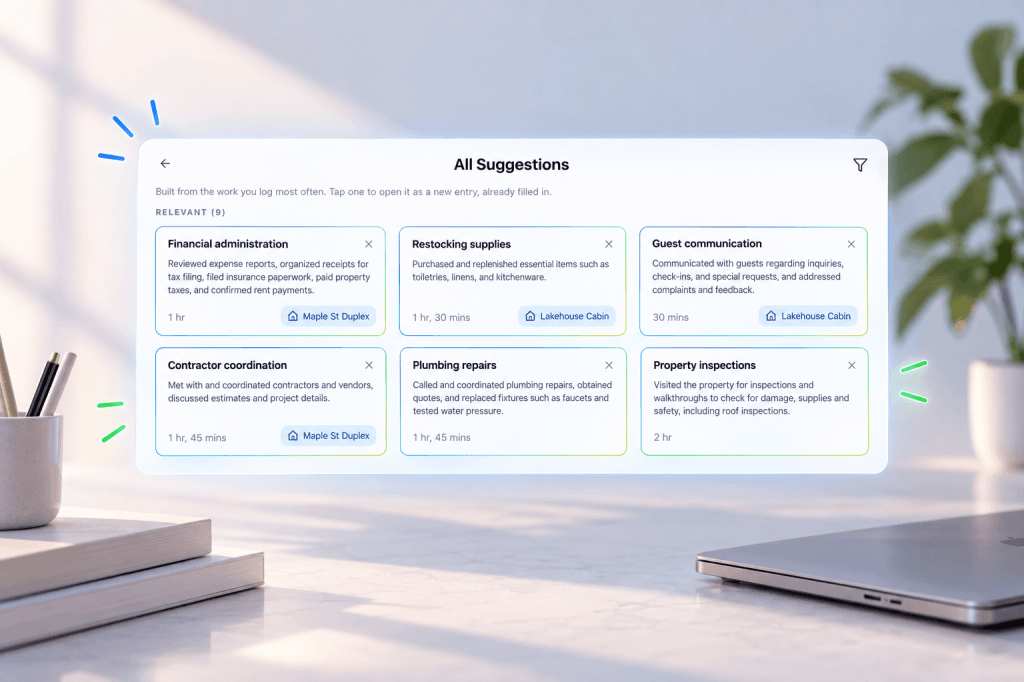
The curated tiles cannot know that you spend Tuesday mornings on HOA correspondence for the duplex. Personalized Entry Suggestions can. Once you turn it on, REPSLog walks your newest entries until it has seen 50 distinct descriptions, asks our AI provider to group the ones that describe the same activity, and keeps any activity that appears at least twice. Each becomes a card in an “Add suggested entries” rail on the Overview: a title, the sentence the entry will start with, the property and the typical duration, with the category and participant travelling along. The property is attached only when every entry behind a suggestion agrees on it, and durations are left blank when yours vary too much to trust.
Tap a card and the entry form opens with all of it filled in. Check the fields, change the date if needed, tap Add Entry. Dismiss a card with the X and it stays dismissed. Suggestions refresh once a week, only after at least five new entries. It is opt-in and reversible: nothing is sent until you press Turn on suggestions, and turning it off in Settings, AI and Privacy stops the feature and deletes the derived profile.
And for a task neither one covers
Log it once, then duplicate it and change the date. Duplicate copies the description, property, category and participant of an existing entry into a new one, so a repeat takes seconds and still gets its own date.
How to use them
- Open the Overview. Under your hour counters, scroll the Common Activities and Recurring Activities rows.
- Tap a tile. Pick the property, fix the duration, tap Add Entry. Save returns you to the Overview, so you can log several in a row.
- On Premium, tap Turn On Suggestions on the “Add suggested entries” card, read what will be sent, and confirm. You need at least 20 entries first.
- When suggestion cards appear, tap one, check the fields, tap Add Entry.
Screenshots: How to Use Common and Recurring Activities in REPSLog and How to Use Suggested Entries on Your Dashboard.
Good to know
- Common and Recurring Activities are on every plan, including Free (the 5-entry Free limit still applies when you save). Personalized suggestions are Premium and need at least 20 entries.
- Both work on iPhone, Android and the web app.
- Tiles never include a property; you choose it each time. The duration on a tile is a typical figure, not a measurement: change it, or use the built-in timer for the real number.
- You cannot add your own tiles. That is what suggestions and Duplicate are for.
- Privacy: the tiles send nothing. Suggestions send your recent entries to our AI provider only after you opt in; providers work under contract and never train on your data.
- Read-only team members do not see the tiles or the suggestions.
Frequently asked questions
Does REPSLog create entries automatically?
No. Tiles and suggestion cards open the entry form prefilled. Nothing is saved until you tap Add Entry.
Are templated entries a problem in an audit?
Identical entries with identical durations and no dates are. Each prefilled entry here gets its own date, property and the duration you set, which is what makes it yours.
Can I add my own recurring activity?
Not as a tile. Turn on Personalized Entry Suggestions and it learns yours from your log, or log it once and use Duplicate.
What does the AI see?
Only when suggestions are on: the descriptions of your recent entries, to group activities that are the same. Turning it off deletes the derived profile.
Do the STR tiles differ from the LTR ones?
Yes. The STR view shows host tasks (turnover, guest communication, restocking); the LTR view shows landlord tasks, including the recurring row.
Related reading
- Stay-at-home parent REPS roadmap
- What counts toward material participation: 50 examples
- How can I log material participation hours faster by voice?
Try REPSLog free for 14 days on iPhone, Android or the web app.
This article is general information, not tax advice. Whether an activity qualifies is a question for your CPA.