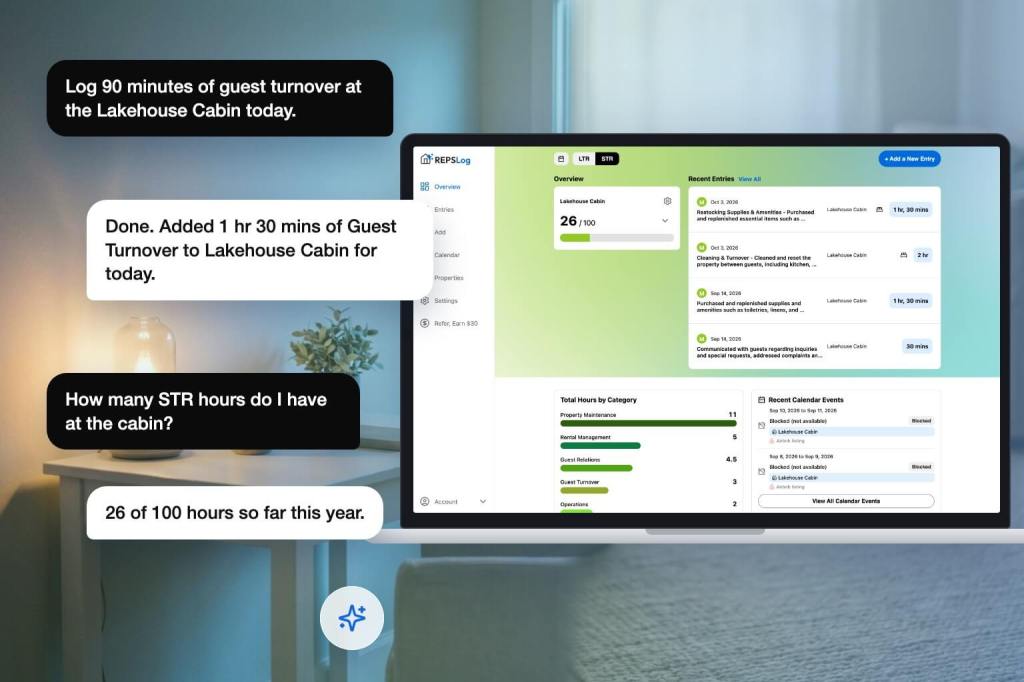
In July we connected REPSLog to ChatGPT, so a sentence like “Log 90 minutes of bookkeeping at the Maple St condo today” becomes a real entry in your account. The connector underneath it is an MCP server, which means it is not tied to one assistant. This post covers the two other doors into the same log: Claude, through a custom connector, and the public REST API, for anything you or your CPA want to build.
Why an assistant is a good place to log hours
The argument is the same one behind voice logging: the entries that survive an audit are the ones made near the event, and the fastest capture wins. If your day already runs through an assistant, or your notes, calendar and inbox are connected to it, telling it what you did is one message. The assistant resolves “the Maple St condo” to the property in your account, and if a name is ambiguous it asks rather than guessing. What counts toward the 750-hour test or the 100-hour STR test is still a question of substance, not of which app typed it.
Claude
REPSLog connects to Claude as a custom connector. You add one address in Claude’s connector settings, sign in on a REPSLog page, and Claude gains a fixed set of tools for your log: create, update and delete a time log; list your logs filtered by date range, property, category or STR / LTR; and get an hours summary, a breakdown, your goal progress, your dashboard figures and flexible stats. It can list your properties, categories and participants, and read two account settings.
The tools are deliberately limited. Claude cannot create, rename or delete properties, categories or participants; ask, and it points you to the app. Editing and deleting entries are allowed, and deleting is permanent, so Claude is instructed to be specific about which entry you mean. Sign-in happens on a REPSLog page, never inside Claude, so the assistant only receives permission to act on your account and never your password. The same sign-in serves ChatGPT, so one REPSLog account covers both, and each is connected and disconnected separately. Every entry Claude creates is saved with a source of Claude, so you can always tell which records came from which door.
The MCP connector, for any client
The MCP connector is what both assistants talk to. It exposes 14 tools: 3 that write (create, update, delete a time log) and 11 that read. Each tool carries its own input rules, so the assistant is shown exactly what the server will accept: a description of 1 to 2,000 characters, a duration of 1 to 1,440 minutes, an optional date, an optional participant of self or spouse, and a property that already exists. STR or LTR is inherited from the property. The connector’s instructions tell the model to use the stats tool for any total rather than adding up a list, so the number you get matches the app.
Sign-in is standard: the client discovers the sign-in server from a public discovery address, opens a REPSLog sign-in page, and you sign in with your account. The connector maps that to your user, confirms Premium, and runs the tool. Premium is checked on every request. Any MCP client that supports remote servers with sign-in can use the same address.
The public API
For scripts, spreadsheets, a CPA’s tooling or an integration of your own, the REST API lives at api.reps-log.com/v1. You manage access in the Developer Portal at api.reps-log.com: sign in with the same account you use in the app, create a key with a name, a set of scopes and an optional expiry. The secret is shown once; rotate it for a new one, revoke it for good.
Scopes are per key and per resource. Time logs have a read scope and a write scope; properties, categories, participants, summaries and settings are read only, so a key that only builds reports never needs write access. With a key you can create, update, delete and list time logs (filtered by date range, property, category and STR or LTR, paged with a cursor), list properties, categories and participants, and get the same summary, breakdown, goal progress, dashboard and stats numbers the app shows. Creating an entry accepts an Idempotency-Key header so a retried request never logs twice. The portal has a Playground to call any endpoint in the browser, a Getting Started page with curl examples, and the full reference with a try-it console at api.reps-log.com/v1/docs.
How to connect Claude
- In Claude, open Settings, then Connectors, and add a custom connector with the REPSLog address from the Help Center article below.
- Claude opens a REPSLog sign-in page. Sign in with your REPSLog account.
- Back in Claude, ask for something small first: “How many hours have I logged this month?”
- Then log one: “Log 45 minutes of tenant communication at Elm St today.”
- Open REPSLog. The entry is there, with Claude as its source.
Step-by-step screenshots: Connect REPSLog to Claude. For the API, start at Developer Portal and API keys.
Good to know
- All three are Premium on the REPSLog side. Your Claude plan also needs to support custom connectors.
- The data an assistant reads leaves REPSLog and goes to that assistant’s provider under the provider’s terms. Turning it on is your choice; removing the connector revokes access immediately.
- Write access is real: an assistant can edit and delete entries. Treat the connection like a login and disconnect it if you stop using it.
- Requests are limited to 60 per minute per connected account or per key.
- Every request is checked against your own account only. A connector or key can never see another user’s data.
- Deleting your REPSLog account removes every connection and every key. It cannot recall data a provider already received.
Frequently asked questions
Can I log REPS hours from Claude?
Yes, through the REPSLog custom connector, on Premium. Claude creates the entry in your real account with the property, category, date and duration you describe.
Is this the same as the ChatGPT app?
Same connector, same tools, same sign-in. Each assistant is connected and revoked on its own.
Can the assistant add a property for me?
No. Properties, categories and participants are read only through the connector and the API. Manage them in the app.
Can my CPA pull my hours with the API?
Yes, with a read-only key you create for them, scoped to time logs and summaries. Or invite them to your account with Read Only team access and let them run the export.
Does the assistant see other people’s data?
No. Every request is scoped to the account that signed in.
Related reading
- Log your REPS hours by chatting with ChatGPT
- How to keep a contemporaneous log that survives an IRS audit
- What should I give my CPA to claim REPS?
Try REPSLog free for 14 days on iPhone, Android or the web app.
This article is general information, not tax advice. Which activities count is a question for your CPA.